
Turn your visual content into
cinematic scroll experiences.
With ScrollCam, it's easy to build mesmerizing cinematic scrollytelling heroes — without AI dependencies, usage limits, or coding.
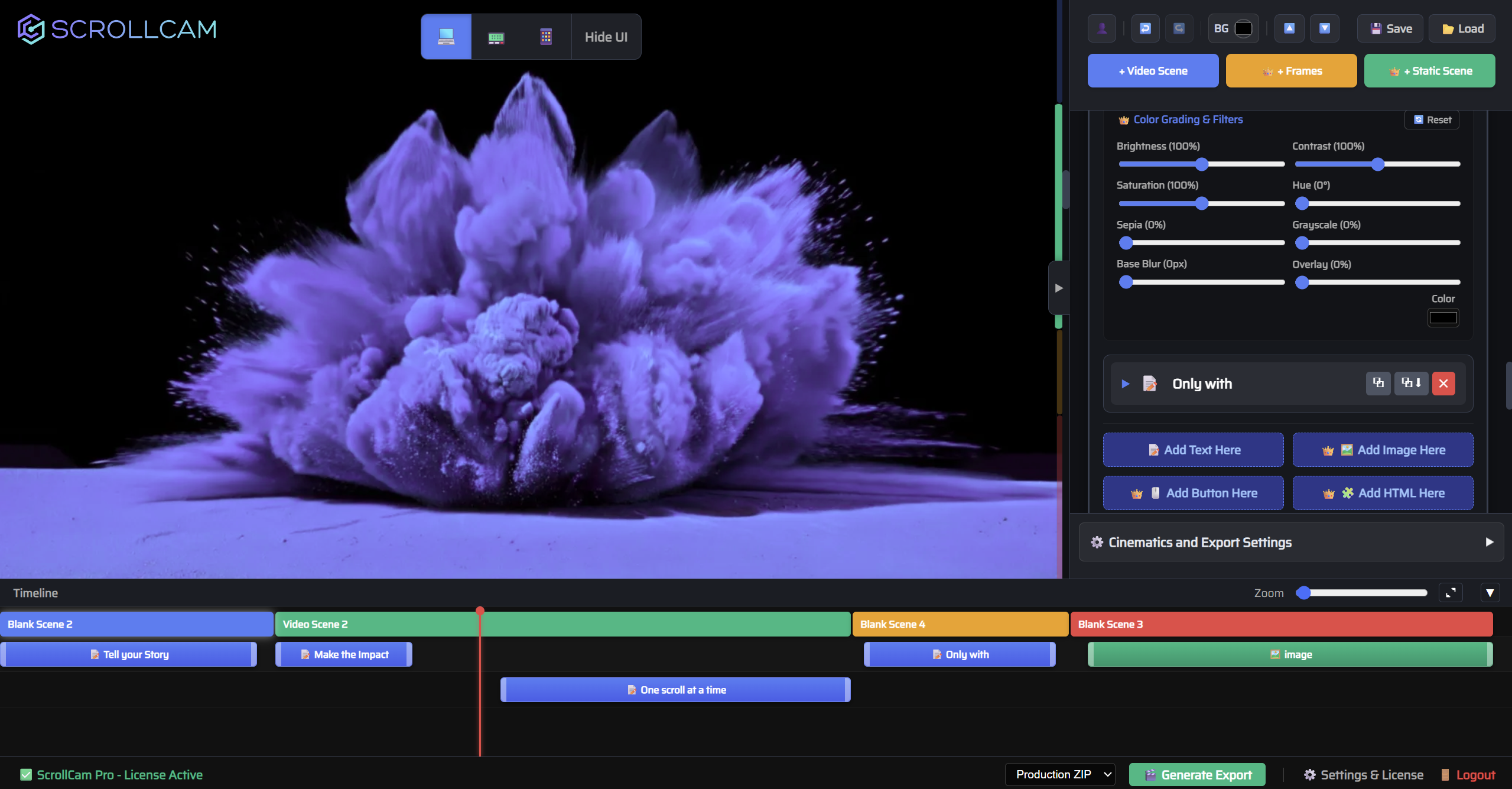

The only Free-Form Editor to create director-grade cinematic scroll experiences — without writing a single line of code.
No-Code Design Studio
Build stunning, interactive web experiences visually. Drag, drop, and customize elements without writing a single line of code. No coding skills required.

100% Human
Creative Control
Retain complete creative control. Hand-craft every experience with precision tools designed for real human creativity over AI-generated randomness.

Real-Time Design Preview
Instantly test your scroll animations across desktop, tablet, and mobile breakpoints directly within the live editor canvas.
150+ In-built Cinematic Effects
Apply complex 3D transforms, glassmorphism overlays, and dynamic text staggers instantly from a massive library of ready-to-use effects.
Pure HTML & Vanilla JS
Export clean, dependency-free code. Enjoy lightning-fast load times and smooth performance without relying on heavy external JavaScript libraries.
Powerful Timeline Control
Master your sequence with an intuitive visual timeline. Set precise entry points, exit durations, and manage overlapping layers easily.

Pixel Perfect Output
Extract optimised or uncompressed animation as you see in editor, ensuring your final web experience looks flawlessly sharp on any screen.

Integrates Everywhere
Download production-ready ZIPs or standalone files to seamlessly embed your cinematic sequences into any custom website or CMS platform.
Create an award-winning Cinematic Experience
for your website in 3 Simple Steps
Turn ideas into jaw-dropping experiences in minutes, not weeks. Simply focus on your design, ScrollCam does the heavy lifting.

1. Upload your Videos, Images or AI Generated Content.
Kickstart your project by importing raw video clips, static images, or a blank canvas directly into the editor. Use the built-in trimming tools to select the perfect segment while the ScrollCam engine automatically creates your scrollytelling experience.

2. Add Text Elements and Tweak Visual Effects
Drag and drop responsive text layers, UI buttons, and custom HTML panels onto your visual timeline. Bring your canvas to life by applying over 100 hardware-accelerated cinematic transitions, including 3D perspective shifts and dynamic character staggers.


3. Export your Experience to Pure HTML, JS and CSS
Generate production-ready assets with a single click. The export engine compiles your sequence into lightweight, dependency-free HTML, Vanilla JS & CSS. Download a clean ZIP package or a standalone file to seamlessly embed your experience into any website.

Designed to fit seamlessly into any website and web technology stack.





Pricing Plans
Pricing that suits all types of designers and creative studios.
All plans include Unlimited Usage, Unlimited Sites and Unlimited Exports.

Customer testimonials
Find out what our users have to say.

Emma Larson
Lead Creative at a design studio

Alex Rodriguez
Frontend Developer at a digital agency

Marcus Jacobs
Freelance UI/UX Designer

Priya Patel
Lead Frontend Engineer at a tech startup

Kim Jenkins
Creative Director at an MNC
Elias Thorne
Senior Developer at an independent agency
FAQs
Below are some of the questions that many of our customers had before using ScrollCam.
ScrollCam automatically converts your video clips, product visualization media and static images into interactive, frame-by-frame Apple-inspired cinematic scroll animations for the web without requiring any custom coding.
Not at all. ScrollCam is a complete no-code platform featuring a visual drag-and-drop canvas, an advanced WYSIWYG HTML builder, and over 50 pre-built design templates.
The engine supports video formats including .mp4, .webm, .mov, and QuickTime, as well as static images like .png, .jpeg, .webp, and .gif. You can also start entirely from scratch using a blank canvas generator.
Projects are exported as clean, dependency-free HTML and vanilla JavaScript. You can download a structured Production ZIP package. The package contains a integration-code.html file with HTML integration in place. For WordPress websites, ScrollCam also offers a dedicated plugin. All other integration guidelines can be found in our official documentation.
Yes, the editor allows you to upload custom typography files (.ttf, .otf, .woff, .woff2) in Pro version or browse and apply fonts directly from the integrated, searchable Google Fonts library.
Yes, ScrollCam features built-in device emulators that let you independently configure element positioning, font sizes, and background video zoom levels across Desktop, Tablet, and Mobile viewports.
The Free plan offers web-optimized 720p frame extraction at 15 FPS alongside core text layering tools. An active Pro license unlocks HD/Original quality extraction, advanced WYSIWYG design studio and tools, over 100 cinematic animations, more elements (Text, Image, Buttons, Custom HTML), Device level visibility, custom fonts, and the ability to save and export production files. Detailed comparison can be found in Pricing Section.
No, the entire ScrollCam cinematic builder—including the video trimmer, frame extractor, and timeline editor—runs directly inside your web browser.
ScrollCam production exports utilize a proprietary, progressive frame loading strategy that prioritizes frame 0 and alternates subsequent frames to make your site interactive instantly while the remaining assets finish buffering in the background.
The built-in video trimmer parses uploads up to 100MB to ensure fluid frame-by-frame performance across variable devices. We recommend a video of maximum 15 seconds per scene for optimal performance.
No, the entire ScrollCam cinematic builder—including the video trimmer, frame extractor, and timeline editor—runs directly inside your web browser.
Want Pro Features?
Sign Up Today
ScrollCam Pro is packed with power beyond your imagination,
yet feels so incredibly simple to use.